With so much to explore in Leonida, saving regularly in GTA 6 is important.
You might want to keep a backup before starting a major mission, making an important story decision, or completing activities that could become unavailable later.
The game gives you both manual saves and an autosave system, but there are a few things worth knowing before you rely on them.
GTA 6 offers 15 manual save slots, allowing you to keep several versions of your progress.
How to Save Your Game in GTA 6?
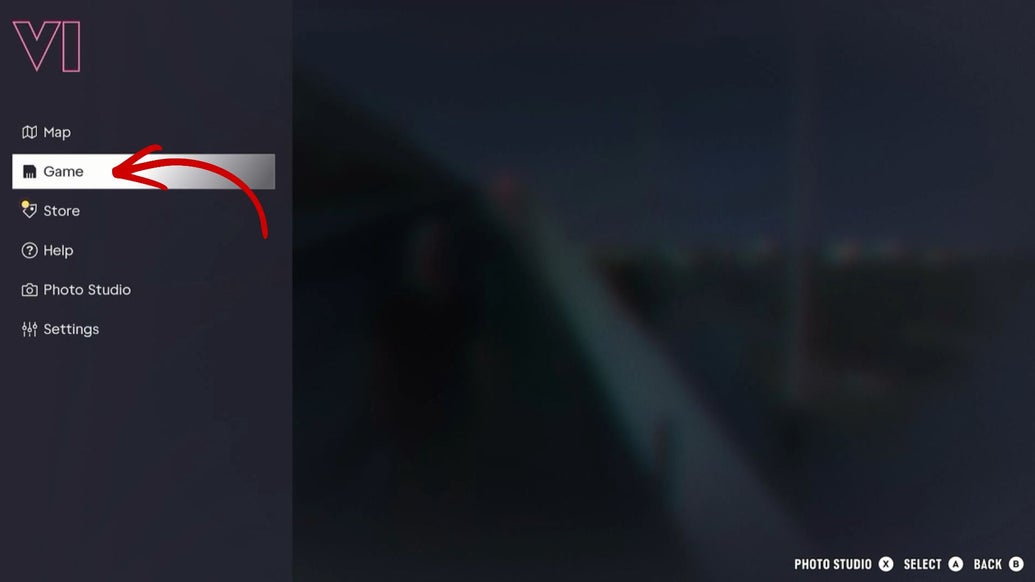
To save manually, open the pause menu by pressing the Options button on PS5 or the Menu button on Xbox Series X|S. Select Game, choose Save Game, and then pick an available slot. You can use an empty slot or overwrite an existing save.
Unlike some earlier GTA games, you don’t need to visit a safehouse or sleep in a bed to save your progress.
You can create a manual save while exploring the open world, making it easy to keep a backup before heading into something important.
You can also load an earlier save through the same Game menu.
However, manual saving is not available while you’re actively completing a mission. The Save Game option will usually be unavailable until the mission ends.
That’s why it’s a good idea to create a manual save before starting a difficult mission or a major heist.
If something goes wrong, you can load that earlier save instead of relying entirely on the game’s automatic checkpoints.
Saving before certain story events can also help you avoid missing activities.
For example, some renovation tasks at Jason’s house become unavailable after he picks up Lucia.
Completing those tasks also affects Jason and Lucia’s relationship. If you want to make sure you don’t miss anything, create a separate save before moving forward with that part of the story.
You can then return to it if you want to complete any unfinished tasks.
GTA 6 also has an autosave system that records your progress automatically after certain missions and important events.
It uses a separate autosave slot, so it does not take up one of your 15 manual save slots. However, there’s only one autosave slot, and each new autosave replaces the previous one.
This means autosave is useful as a safety net, but it shouldn’t be your only way of protecting progress.
If you want to keep a particular point in the story, make a manual save rather than hoping the autosave will preserve it.
There’s one more important detail: loading an older manual save can replace your current autosave.
Before going back to an earlier point in the story, consider creating another manual save of your current progress.
That way, you won’t accidentally lose the progress you’ve made since your older save was created.
A simple habit can save you a lot of trouble in GTA 6, keep a few manual saves for important story moments, use different slots instead of constantly overwriting the same one, and make a fresh save before major missions or decisions.
The autosave system is helpful, but having your own backups gives you much more control over how you play.